

G6 · before your first journey
Match the earlier UK or later handbook controls stated in each step.
Before leaving with a G6, check the car against the order, record defects/missing items and test both the physical keys and the supported owner-app access. Set the driving position and locate essential controls while parked, then check the charging setup with the handover team.
Use this with the supplied handbook and the actual UK G6 being handed over, including its generation and fitted equipment.
What to do
- Match registration/VIN, derivative, colour and options to the paperwork. Inspect paint, glass, wheels, tyres, seats and trim in good light and put concerns on the written collection record.
- Check keys/NFC cards, cables, manuals and accessories against the order. Locate the tyre label, recovery information and the correct emergency connector-release instructions.
- Install the official app, use the purchase/retailer-linked account and confirm the correct vehicle. Activate supported phone access beside the car; test lock/unlock with the physical key retained.
- Adjust seat, mirrors and steering wheel and save the profile where fitted. Check units, language, clock and navigation privacy; pair calls/media separately from the phone key.
- Locate demisting, hazards, Park, drive selection and assistance cancellation. Review assistance preferences before using an unfamiliar function.
- Check Charging and Discharging → Charging where that is the supplied route. Review the target/schedule, ask for connector locking/normal release to be demonstrated and try a short AC session where available.
What to expect: You have the ordered items, a written record of concerns, working access and a known route to essential controls, charging and support.
Complete setup while parked. For seat adjustment, release the belt and keep people, fingers and loose items clear of the seat and rails; fasten the belt again before moving off. Do not drive away with an unresolved safety warning, unsafe tyre/visibility problem or required access/control unavailable; have the supplying team assess it first.
Set the driver's seat before adjusting the mirrors
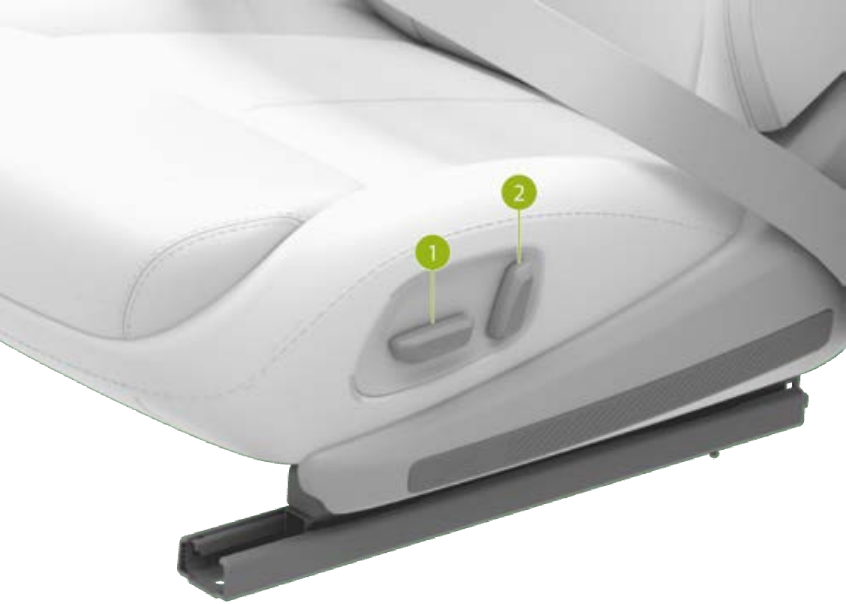
On the earlier UK G6, use the switches on the side of the driver's seat for its position and backrest. The matching handbook also shows vehicle controls → Seat for seat selection, lumbar adjustment and memory; these are separate from pairing a phone key.
- While parked, release the seat belt and check clearance. Use the long seat/cushion switch, marked 1 in the illustration, forward/backward to move the seat along its rails. Move the rear part of that switch up/down to change the driver's seat height. Make small adjustments and check that you can use the pedals and see the displays comfortably.
- Use the separate backrest switch, marked 2, to change its inclination. Recheck your reach to the steering wheel and pedals after moving the backrest; setting the mirrors first can leave them wrong after a seat change.
- For lumbar support, open vehicle controls → Seat and select the driver. Enter the seat-adjustment panel. On this handbook edition, enable lumbar adjustment by the steering-wheel controls on that panel, then use the two rollers for support height/position. Check the support response as you adjust; do not confuse this with the normal volume or temperature function when the seat panel is inactive.
- Save through the Seat screen's prompts. Its seat-memory control recalls the saved position. Confirm the position is right before moving off and adjust the mirrors afterward. A working phone key does not itself establish that a seating memory has been selected.
If the position still does not suit you: ask the handover team to demonstrate the driver's available adjustments while you are parked, including the Seat panel. Check that each switch produces the expected movement. A switch that does nothing, a seat that will not hold position or an obstructed rail needs an identified check before driving; do not force a mechanism or dismantle it. If you still cannot reach the controls comfortably, resolve the fit with the handover team before leaving.
Choose the pedal response before your first drive
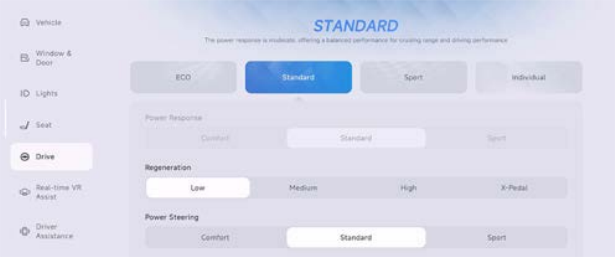
On the earlier UK G6, open vehicle controls → Drive. The handbook describes ECO as a slower power response and STANDARD as moderate. These are normal driving-mode choices, not a repair for abnormal acceleration.
- While parked, note the selected driving mode. Choose ECO if you want to try its slower response, or STANDARD for the documented balanced setting.
- Read back the selected mode and the settings shown below it. Use the top driving-mode row: Power Steering → Comfort is a separate steering setting, and Regeneration changes energy recovery when slowing.
- Use gentle, progressive accelerator input on your familiar first route and keep the brake as your normal stopping control. Ask the handover team to demonstrate the expected response before leaving if it feels abnormal rather than simply unfamiliar.
Useful result: you know which driving mode is selected and which control you changed. Leave an unexpected surge, delayed response or vehicle warning on the handover defect record for assessment; changing modes does not establish that a fault is fixed.
First controls to find while you are parked
Earlier UK G6 mirrors: Drive → Side Mirrors, or the swipe-down adjustment shortcut; use the steering controls indicated by the panel. Select the intended habit through the account avatar before adjusting.
Earlier UK G6 clear-screen view: open front climate, turn it on and choose AUTO with a suitable temperature. Use front defrost when needed. For wiping, LO/HI provide manual speeds; hold the washer button for front spray, rather than a brief single-wipe press.
Phone access versus audio: the owner authorises an additional driver under Settings → Authorization; the driver accepts and activates their own key. Media pairing is separate. Keep the physical key with you while testing one lock/return and normal starting.
First AC charge on the 2025 RHD layout: park, open the flap, insert the correct AC plug fully and complete the wallbox’s normal authorisation. Check that the target exceeds the present percentage and the intended timer is active. Watch for delivered energy, then use the normal Stop Charging control before unlock/removal. A waiting schedule is different from active charging.
Indicators keep flashing after a lane change
The earlier UK G6 stalk has a light lane-change position and a full-travel turn position. A light movement to the resistance point and release gives three flashes; pushing to the end starts continuous indication. Check the instrument arrow rather than assuming a small lane-change steering movement cancelled it.
- Learn the light press while parked. Move the stalk down for left or up for right, only as far as the resistance point, then release it. The stalk returns to its resting position and the corresponding indicator should flash three times.
- Distinguish full indication. Moving fully down selects the continuous left signal; fully up selects the continuous right signal. To stop a continuous signal, move the stalk to a left or right lane-change position and check that the flashing arrow stops. The steering wheel returning to centre after a turn also cancels it. Use the light stalk position for your parked cancellation check.
- Check that it stopped. Confirm the flashing arrow and ticking end, and compare the exterior lamp while stationary. If continuous indication does not cancel through the documented stalk control, have the handover team demonstrate that exact action on your car and investigate a repeatable stalk/indicator fault. State whether a light three-flash request, full-travel signal or cancellation failed; those are different observations.
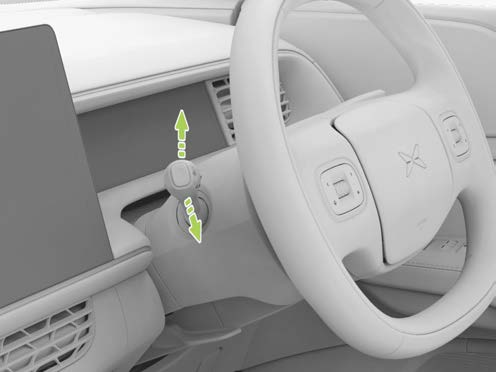
A successful light-press check gives three flashes and stops; successful cancellation ends the continuous signal. These are manual stalk controls, separate from Auto Lane Change's own completion/cancellation behaviour.
If that did not work
Ask the handover team to record every unresolved defect/missing item and agree the next check and contact in writing. Confirm insurance, handbook access and roadside details before leaving; use a familiar initial route and learn one assistance function at a time.
This is an editorial handover checklist. It does not replace the exact purchase paperwork, supplied handbook or the retailer’s response to an identified defect.
Sources checked 23 October 2026: XPENG UK handbook, XPENG handbook.
First-drive controls checked 26 October 2026: earlier UK G6 handbook, printed 228 (PDF 229); separate steering and energy-recovery controls, printed 221 and 232. Later G6 layouts need their matching controls.
Driver-seat controls reviewed 26 October 2026: original UK G6 handbook, printed 174–175 and 179–180 (PDF 175–176 and 180–181). These are the earlier UK driver’s-seat controls; passenger adjustments can differ.
Indicator controls checked 27 October 2026: earlier UK G6 handbook, printed 224 / PDF 225. Match this stalk and handbook to the delivered car.