
OWNER ANSWER / MYXPENG
XPENG X9 charging cable will not release: safe recovery
Stop the X9 charging session, confirm its state on the car and post, then unlock normally before trying gentle straight withdrawal. The matching handbook includes a screen release and a boot-side emergency ring; use the stopped-session conditions below before the ring.

Start here
- End charging using the supported control and wait for confirmed stopped-session status rather than relying on a momentary zero-kW reading.
- Unlock the X9 normally, support the cable and use the connector’s intended release without force.
- Complete any post-specific return/release instruction. Call the network operator if its session or latch remains active.
- For the documented X9 interface, open vehicle controls → Unlock Charging Connector in Emergency → Help, then Unlock charging connector. Read the confirmation: it ends an active charge early. The handbook also shows Charging and Discharging → Charging → Charging Connector Emergency Unplugging in its slow-charge instructions. Use the actual available control; a closed flap hides Unlock Charging Gun.
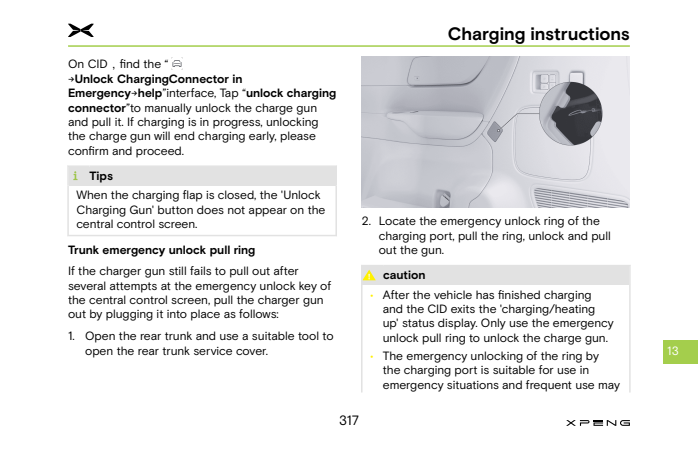
Only after charging has finished and the centre screen has exited charging/heating status, open the boot and identify the charging-port service cover in the diagram below.
Open that cover with an appropriate tool, identify the illustrated charge-port release ring and pull it to unlock, then withdraw the supported plug straight out.
Stop if the cover, ring or stopped state cannot be positively identified; do not pull a neighbouring cable. This is an emergency action, not a routine release method.
What to expect: The connector releases without force after the session ends and the intended lock opens.
Do not force, lever or dismantle a connector, move the car while connected or investigate damaged/energised equipment. Stop for heat, smoke, liquid or electrical warning and keep people clear.
If that did not work
Give the operator the post/connector and session state; give XPENG the exact X9/build, AC/DC, warning and which side still appears locked. Request confirmation of session termination and the appropriate inlet-lock recovery for that vehicle.
Sources: XPENG handbook. Checked 23 October 2026.