
GUIDE / MYXPENG
XPENG G9 Rapid Charging: International-Market Guide
For the G9 covered by the English 2025 V5.6.0 handbook, use the car’s navigation to the rapid charger and check Charging and Discharging → Charging → Temperature Control before Fast Charging. That lets the matching system prepare battery temperature; the result still depends on the charger, battery charge level and conditions.

Match the car before comparing speeds
The renewed European G9’s 800V and 5C LFP description comes from XPENG’s July 2025 launch material. It does not describe every earlier G9 or the UK G9L. Use the actual derivative’s handbook and charging specification, not a headline peak from another version.
Check one charging session
- Choose a proven charger suitable for the exact car, with a safe arrival reserve and an alternative site.
- On the matching V5.6.0 screen, check the temperature-control setting above and navigate to the charging station through the vehicle. Battery preparation uses energy, so allow for it in the reserve.
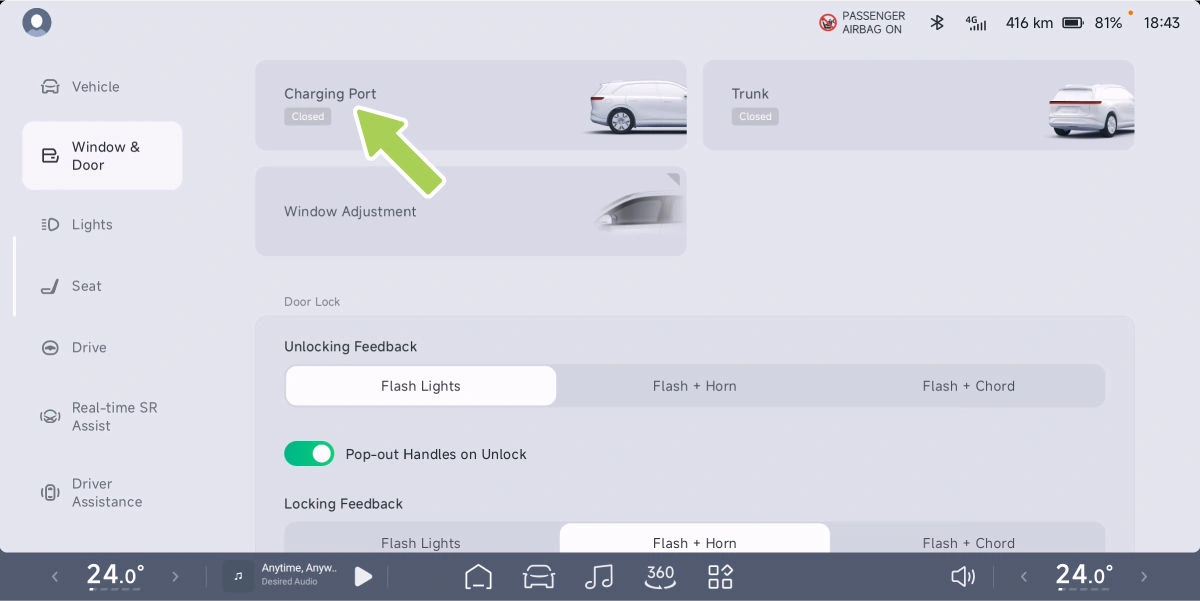
- Park and open the charging flap. Select P. On the G9 covered by this handbook, the port is on the rear right. Open vehicle controls → Window & Door → Charging Port, or use the Charging Port shortcut in the swipe-down panel.
- Connect the plug. Remove the port dust cover and any connector cover. Insert the compatible charging connector straight into the port until it clicks into place, without rocking it. The handbook says to place the shared dust cover over the unused charging port.
- Authorise this connector and check charging has begun. Select the matching connector number on the chargepoint or its app, where required, and complete the displayed payment/start sequence. Check the car’s charging display and the chargepoint: energy delivered should begin to increase. A payment authorisation or a connected-plug message alone is not a charging session.
- Compare energy added and elapsed time across a similar battery-percentage interval. A useful result is a continuing session without warnings; power normally changes through the session and falls as the battery fills.
- If unusually slow, check the charger’s reduced-power or fault message and site sharing. Compare with a previous similar session; when practical, compare once at another proven high-power site.
Finish the session and remove the plug
- Stop charging before unplugging. To finish early, tap End Charging on the G9’s centre screen and complete any stop confirmation required by the chargepoint. Wait until the displays show the session has ended.
- Release and put the connector away. With the vehicle unlocked and the session stopped, hold the connector’s release button where fitted and withdraw it straight out. Replace the port dust cover, close the charging flap and return the plug to its holder.
If it has not started: check that the chosen connector number matches the one in the car and that the charge limit is above the present battery level. On this edition, the limit is under Charging and Discharging → Charging → Charging Limit. If payment/start has not completed, finish that step on the chargepoint. If the car displays a charging fault, stop the attempt; do not keep restarting it. If it is charging but slowly, use the comparisons below. If the connector stays locked, confirm the stopped state on both displays, unlock the vehicle again and retry the normal release without force. If it still will not release, leave it seated and request assistance with the charger ID and the car’s exact message.
If the second session is still unusually slow
Keep the charger IDs, receipts, arrival and finish percentages, temperature, times and any displayed power graph or warning. If the battery is near 80% or above, either stay for the extra range or end normally when you have enough; another stall will not remove normal taper. If the actual connector rating is the ceiling, use a higher-rated compatible unit when available and useful. If one different unit is faster, continue there. Only if low output keeps following the prepared car across suitable sites should XPENG check charging fault records and battery-temperature preparation for the exact car/software. This comparison narrows the cause rather than promising a particular peak.
Sources checked 23 October 2026: Current XPENG UK model list; XPENG handbook directory; XPENG global G9 model page; XPENG European launch announcement, 11 July 2025. Control references match the English 2025 G9 handbook, V5.6.0; use your supplied market and equipment edition.
Connection, charging-flap and stopping controls rechecked 25 October 2026 against that same G9 V5.6.0 handbook, PDF pages 284 and 286–290.