
OWNER ANSWER / MYXPENG
XPENG X9 wireless phone charging not working or overheating
On the X9 MY26 English RHD V5.8.5 layout, open Settings → Energy → Power Supply and enable the fitted front- or second-row phone pad. The earlier 2025-titled X9 handbook uses Charging and Discharging → Power Supply instead. Place a compatible phone screen-up and slide it to the bottom along the guide so it aligns and can be cooled.
Choose the menu matching your handbook: earlier 2025 English RHD, PDF 257–260, or MY26 English RHD V5.8.5, printed 231–234 / PDF 229–232. The common placement and cooling checks below apply to the fitted pad; the cable fallback is separately labelled MY26.
Start here
Use the fitted pad and a phone that supports Qi charging. With the car parked, remove the case, coins/cards and magnetic accessories, check the tray is dry and clear of obstructions, and let an already-hot phone cool naturally.
- Enable the pad you are using: MY26 V5.8.5 uses Settings → Energy → Power Supply, with first- and second-row wireless charging controls. The earlier 2025-titled edition uses Charging and Discharging → Power Supply.
- Place the bare phone screen-up on the correct pad.
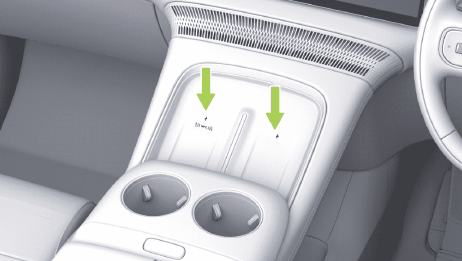
- Slide it fully to the bottom along the limit bar so the coil aligns and cooling airflow reaches it.
- Watch for the charging icon. If charging cycles, make one small alignment adjustment and test another compatible phone.
- Remove the phone immediately if a metal-object alert appears or heat becomes excessive.
On MY26, the front pads are at the front of the centre armrest console. A fitted second-row pad is on the seat's outer armrest; its charging position is different from the inner-seat USB-C power socket.
What success looks like
The CID displays charging and the phone maintains it without repeated start/stop cycles. Mild warmth can be normal, but the cooling outlet should not be obstructed and the phone should not become dangerously hot.
Keep metal, magnetic cards, liquid and heavy objects off the pad; stop for excess heat or a foreign-object warning. Follow the handbook and device manufacturer’s medical-device separation advice. Do not leave a phone charging unattended in the parked vehicle.
MY26 X9: use USB-C if wireless charging keeps stopping
Use the intended power socket so the phone can charge without another attempt on a hot or repeatedly interrupted wireless pad.
- With the phone cooled naturally and removed from the pad, disable that wireless position through Settings → Energy → Power Supply if you leave the phone in its tray.
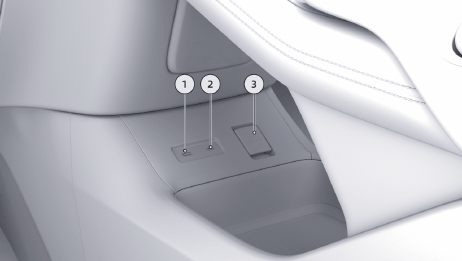
- Use a suitable charging cable in the front Type-C power socket 2, rated up to 60 W in this handbook. A fitted second-row inner-seat Type-C power socket is also rated up to 60 W; the third-row side-trim Type-C sockets are rated up to 15 W. Actual phone power depends on the phone and cable.
- Check the phone shows wired charging and continues without a temperature warning. Do not charge from the front USB media socket 1: this MY26 handbook warns that doing so can restart or blank the centre screen. If a known-working cable/socket charges the phone while the pad repeatedly fails with two compatible bare phones, leave the pad off and use the specific pad-check branch below.
If wired charging fails too: compare another suitable cable and a known-working compatible power source, and read the phone's own charging/temperature message. That separates a phone/cable problem from the wireless-pad comparison.
If that did not work
If two compatible bare phones fail on an enabled, clean pad, stop using it and ask XPENG service to check pad detection and cooling at that position. Give the model/build, full XOS, pad position and any warning. If only one phone fails, check that phone’s charging, temperature and battery-protection settings.
The handbook describes up to 50 W on compatible pads; second-row charging is equipment-dependent. Keep the lower cooling-air outlet clear, with the phone covering it as the diagram shows.
Source checked 23 October 2026: X9 2025 international English RHD, PDF 257–260. Official XPENG source.
MY26 controls, pad positions and power sockets reviewed 27 October 2026: XPENG X9 MY26 English RHD handbook, V5.8.5, printed pages 231–234 and 237–238 (PDF pages 229–232 and 235–236). Earlier 2025-titled directions and their original checked date are retained above.