
OWNER ANSWER / MYXPENG
XPENG G6 Charging Connector Will Not Release: What to Do
End charging, confirm that both the car and charger show the session has stopped, then unlock the G6 and remove the plug straight out without force. A plug still locked during an active session or final communication needs the charging session resolved first.

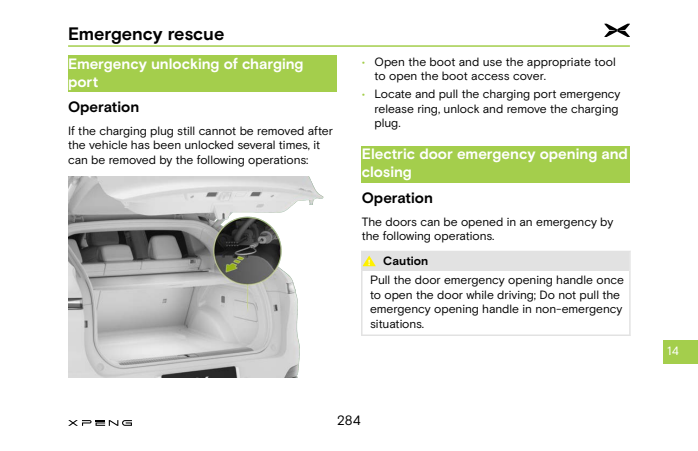
If normal release fails, the earlier UK G6 handbook documents a boot-access-cover emergency-release ring. Use it only after charging has ended and the exact diagram matches your vehicle.
Stop for heat, smoke, internal water ingress, damage, electrical warnings or a mechanically jammed connector. Keep clear of traffic/damaged equipment; do not twist, lever or pull unidentified wires. Ask the operator/XPENG for help if the session will not end or the parts are unclear.
Release the connector in order
- End the session using the vehicle, chargepoint or relevant network app. Check the stopped state on both charger and car.
- Unlock normally and allow their communication to finish. Support the connector’s weight and try straight withdrawal.
- If it remains locked, check nobody restarted the session. Repeat the documented normal unlock once; if a public charger still shows an active/failed session, call its operator with the unit ID.
- Only after normal release has failed and charging is confirmed stopped, open the boot. The earlier UK diagram below shows the charging-port service cover in the right-side boot trim. Open that cover with an appropriate tool and identify the illustrated ring; the original handbook page remains an optional source reference.
- Pull the identified charging-port emergency-release ring as the handbook shows, then remove the plug without force. If it still will not release, stop and contact the operator and XPENG.
Success: the inlet lock releases and the connector withdraws easily. Emergency release is not an everyday workaround for a recurring lock fault.
If it remains stuck or happens again
Give the operator the charger ID, connector type, time, battery percentage, exact warning and stopped/active status on the car, charger and app. Ask it to confirm the session ended. If it happens repeatedly with the car, ask XPENG to check inlet-lock operation and the charging/unlock communication using that sequence.
Sources checked 23 October 2026: XPENG UK handbook. Earlier UK G6 handbook PDF 285/printed 284 release-ring diagram; match car/edition, ended session and undamaged equipment.